When homeowners ask me about zigbee bulbs, they are usually trying to solve two problems at once: they want convenient smart controls, and they want rooms that still look good when the novelty wears off. That second goal matters. A bulb can respond instantly to an app and still make a kitchen feel blue, a living room feel flat, or a bedroom feel like a hotel corridor.
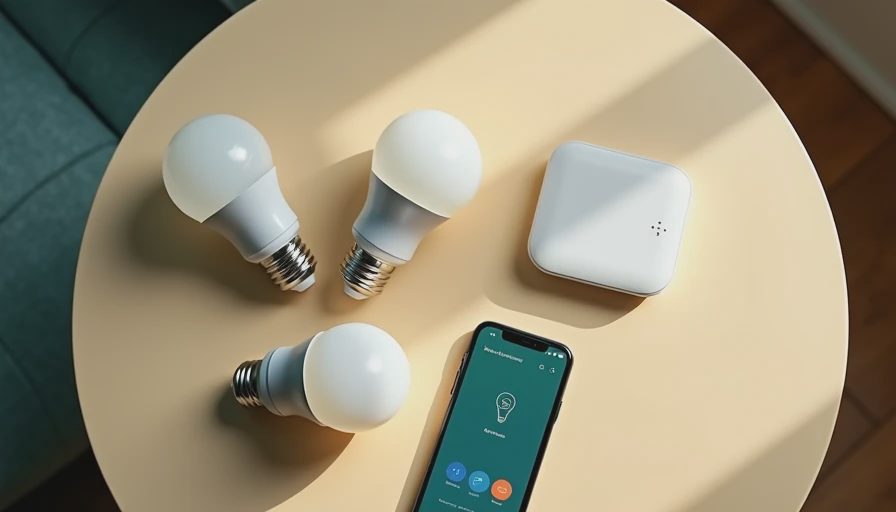
Zigbee is a wireless communication standard used by many smart-home devices. Unlike a typical Wi-Fi bulb, a Zigbee bulb usually communicates through a hub, such as a Philips Hue Bridge, Amazon Echo device with a built-in smart-home controller, or another compatible Zigbee gateway. The result can be a responsive, low-power network that does not require every light to compete directly for space on your home Wi-Fi network.
What Zigbee changes in a lighting system
The first useful distinction is between the light source and the control system. Zigbee does not automatically make a bulb brighter, warmer, or better at rendering color. It determines how commands travel: on, off, dim, color change, and sometimes more advanced scenes. The LED itself still determines beam spread, brightness, color temperature, and color rendering.
A Zigbee bulb can be part of a mesh network. In simple terms, powered devices can help pass signals to other devices, allowing coverage to extend beyond the range of one central hub. That is useful in a larger house, where a back bedroom or detached addition may be too far from the router. The network becomes more dependable when compatible powered devices are distributed throughout the home rather than clustered in one room.
There is also a practical advantage during busy evenings. A household might have phones, televisions, cameras, laptops, and streaming devices using Wi-Fi. Moving lighting traffic to a Zigbee network can reduce congestion and keep basic controls responsive. It is not magic, and compatibility still matters, but the architecture is sensible for a home with many connected lights.
Start with light quality, not the app
Before comparing hubs, look at the specification sheet. For a living room, I generally begin with a color temperature around 2700K to 3000K. The lower number produces a warmer appearance; the higher number feels cleaner and more energetic. In a kitchen, 3000K is often a comfortable compromise, while a utility room or workshop may benefit from 3500K to 4000K if the surrounding finishes support it.
Color rendering is just as important. CRI, or Color Rendering Index, describes how naturally a source reveals colors compared with a reference light. A CRI of 90 or higher is a strong starting point for living spaces, kitchens, art, wood finishes, and clothing. Some zigbee bulbs advertise impressive color-changing effects but provide mediocre white light. If you mostly use the bulb in white mode, prioritize its white-light performance over a large color palette.
Brightness needs context too. A 60-watt-equivalent bulb commonly produces roughly 800 lumens, but the useful amount of light depends on the shade, ceiling height, wall color, and number of fixtures. Four dimmable bulbs in a semi-flush ceiling fixture will usually feel more comfortable than one extremely bright bulb in the center of a room.
Where these bulbs make the most sense
In a bedroom, zigbee bulbs are helpful when you want a gradual wake-up scene, warm evening light, and one-tap control from the bedside. Use a warm white setting near 2700K and avoid placing the brightest lamp directly in your line of sight. A table lamp with an opaque or fabric shade can soften the source while the smart control handles timing.
In a kitchen, use them for the decorative or ambient layer, not as a substitute for task lighting. Under-cabinet fixtures should illuminate the countertop from close range; a ceiling bulb several feet away cannot prevent shadows from your own body. Zigbee bulbs can coordinate the ceiling fixtures with under-cabinet lighting, but each layer still needs the right physical location.
In a hallway or stair area, the mesh-network benefit can be useful because these spaces connect rooms. A motion-triggered scene can provide low-level night lighting without turning the entire house into a brightly lit workplace. Set the scene dim enough to preserve night vision, particularly near bedrooms.
Hub compatibility is the detail people skip
A bulb may use Zigbee and still fail to work with the hub you already own. Manufacturers implement features differently, and a basic on-and-off function may work while color control, firmware updates, or power recovery settings do not. Before buying a multipack, confirm the exact bulb model in the hub’s compatibility list.
Philips Hue is a polished route for homeowners who want a tightly managed ecosystem, while brands such as Sengled offer Zigbee options at different price points. Amazon Echo models with Zigbee support can be convenient for a smaller installation, although capabilities vary by device generation. A separate hub typically costs about $30 to $70, and individual smart bulbs often range from $10 to $50 depending on brightness and color features.
Think about what happens after a power interruption. Some bulbs return to their previous state, while others turn on at full brightness. In a bedroom or nursery, that behavior is not a minor detail. Choose a system that lets you set power-on behavior, then test it before installing bulbs in hard-to-reach fixtures.

A simple plan for a renovated room
For a living room renovation, I would approach zigbee bulbs in five steps. First, draw the room and mark seating, artwork, reading chairs, and paths. Second, divide the lighting into ambient, task, and accent layers. Third, select fixtures and beam directions before selecting smart features. Fourth, specify matching color temperature and strong color rendering across the main sources. Fifth, assign scenes only after the physical lighting works well at the wall switch.
For example, a 14-by-18-foot living room might use four recessed fixtures for soft ambient light, a floor lamp beside the reading chair, and two adjustable accent lights aimed at artwork. The smart system can create a “watching” scene at 30 percent brightness, a “reading” scene that raises the chair lamp, and a “cleaning” scene that brings the ceiling fixtures closer to full output. The control adds flexibility; it does not have to compensate for poor layout.
Keep a conventional control strategy available. Smart lighting is frustrating when guests cannot find the app or a wall switch cuts power to the bulb. In frequently used rooms, consider smart switches, scene controllers, or switches designed to remain powered. The bulb cannot receive a wireless command when someone has physically disconnected it at the wall.
Buying checklist and final recommendation
Before checkout, confirm the socket type, voltage, lumens, dimming range, color-temperature range, CRI, hub compatibility, and physical dimensions. Check whether the bulb is rated for enclosed fixtures if you plan to use it inside a glass globe. Verify that the fixture’s maximum wattage and the bulb’s heat requirements are compatible. For damp locations, use only products specifically rated for that environment.
Choose zigbee bulbs when you want a scalable home system, reliable local control, and coordinated scenes across several rooms. They are especially sensible in a renovation where you can plan hub placement and keep smart lamps powered. For one inexpensive lamp, a Wi-Fi bulb may be simpler. For a whole-home lighting plan, however, the mesh approach can be easier to manage over time.
The best result is not the most animated color scene. It is a house where the kitchen supports cooking, the living room supports conversation, and the bedroom helps you slow down. Use zigbee bulbs as a control layer on top of sound lighting fundamentals, and the technology will stay useful long after the first installation day.